Over the past decade, containers have established themselves as the tool of choice for deploying cloud-native applications, primarily due to their portability, scalability, and consistency across different environments. By packaging code with all of its dependencies, containers ensure that applications run the same way on a developer’s laptop as they do in production environments, making deployments faster and more reliable. But the value of containers in the software development lifecycle isn’t strictly limited to the deployment of applications. Lightweight, isolated, and reproducible environments also enable containers to serve as valuable tools for developing applications themselves.
Today, we’re excited to announce the first expansion of our container image library into development containers. Beyond CI/CD and deployment use cases, these images enable developers to utilize a containerized environment for application development by packaging the necessary elements of a development environment, including tools, dependencies, and configurations, into a containerized format.
Starting today, the latest versions of our development containers for Go and .NET (.NET SDK) are now available on Docker Hub. Other development containers are in production and will roll out as they become available. Have one you’d want to see? Contact us.
Types of Containers
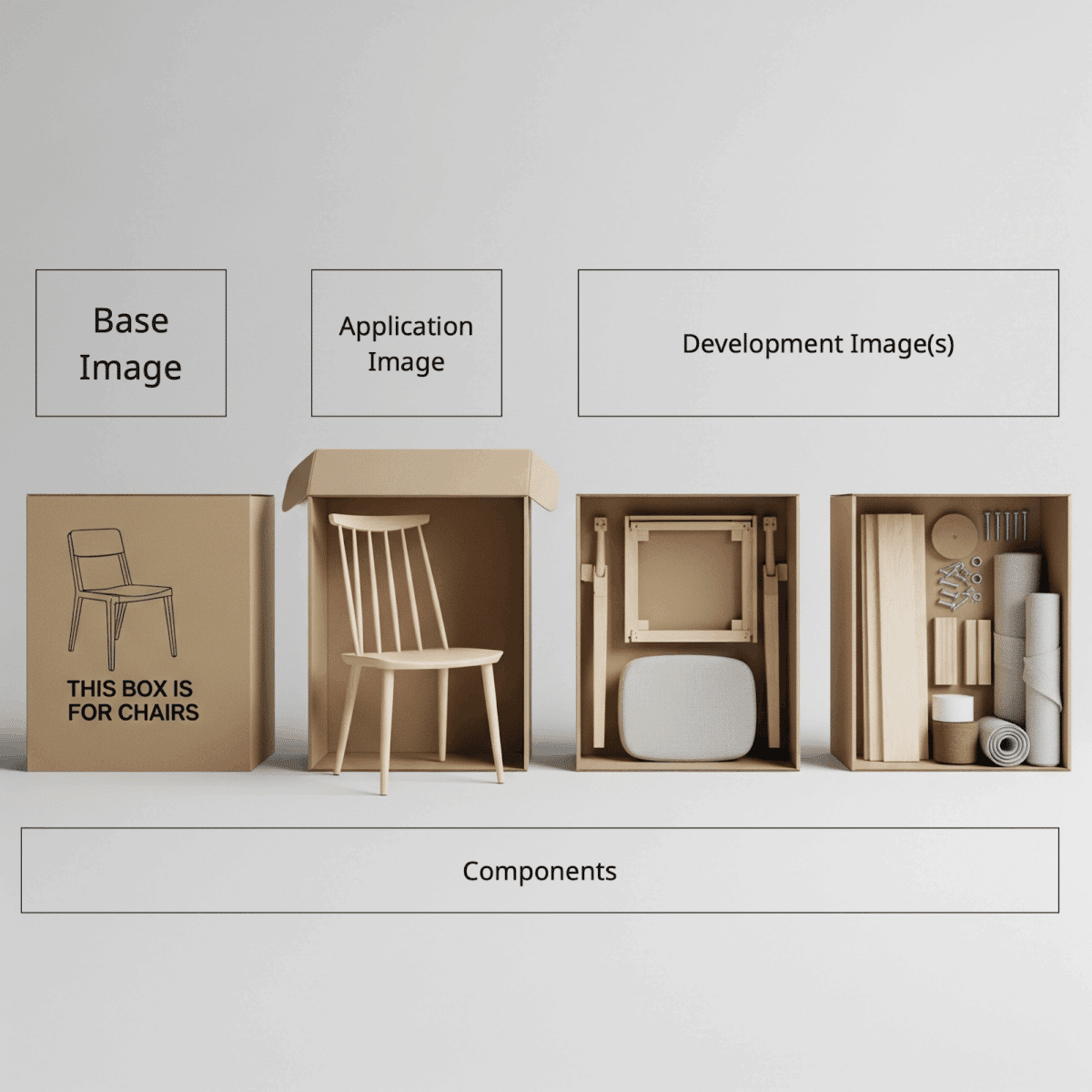
To further illustrate the differences between development containers and the base runtime images we delivered at the launch of ActiveState Secure Containers, it is helpful to consider how everyday furniture is packaged and distributed to its end user.
Base Images Similar to a box used to securely ship the contents of your furniture, a base image is a minimal, production container intended for packaging your pre-built applications for shipment. These images include only what is required to ensure that your applications are deployed securely to their final destination. We currently provide several base container images for various programming languages and frameworks, including Python, Java, Node.js, and more. Application Images Application images represent a fully assembled piece of furniture that is delivered to your door. These images are ready to use with no further modifications and are designed to be used directly as drop-in replacements for popular databases, web servers, and more. Common examples often include applications such as Postgres and Nginx. Development Images Finally, similar to what you might receive from Ikea, Development images provide all of the necessary components, tools, and packaging to assemble your own piece of furniture. Development containers are lightweight, portable environments designed to standardize the developer experience. They package an entire environment, including tools, dependencies, and configurations, all into a containerized format.
The Power of Development Containers
For teams not familiar with development containers, the first and most obvious question is why leverage a containerized environment for something typically done locally on a developer’s machine? To answer this, consider the following scenarios:
You’re a consulting firm, often working with clients using different tools, versions of technologies, or entirely different language ecosystems. To keep your team’s machines ready to work, developers must undergo a painful exercise in managing development tools, versioning, and dependencies. When everything is installed locally, switching between projects can be a pain. Developer containers isolate different client projects, ensuring code and credentials never mix between environments.
New developers just started at your organization, and their first task is to set up a development environment on their machine. Instead of getting up to speed on your product and development processes, devs must now spend days working to get up and running. Developer containers allow developers to all use the same setup without documenting a long list of installation setups. They also ensure that every developer is using a pre-vetted image to ensure compliance with security and other policies.
Finally, for some projects, there is value in having isolation from your standard development environment. You may be using specific versions of compilers, interpreters, or build tools, or you may want to spin up a short-lived environment for experimentation. Alternatively, you may want to leverage an AI tool like Claude Code, but you want to ensure you do so safely.
For any of these challenges, development containers offer a means to package up everything needed to get the job done, all in a lightweight and portable environment, and eliminate much of the friction that comes from environment inconsistency, and
Why Security Still Matters
While it’s relatively apparent why containers that are run in production need to be secure, it’s less clear why hardened, minimal images make sense in the context of a development environment.
Supply chain attacks have implications that extend beyond production workloads. If you install a malicious package directly onto your machine, that package can execute code, ultimately impacting the host. While development containers can help isolate the impact to only the container itself (as long as it runs with no access to root), it’s also worth considering that application code written in development containers will more than likely make its way to production containers as well. This means that if your system was compromised in any way during development, there is still a potential for malicious code to infiltrate the production environment.
To circumvent this, ActiveState’s minimal development images are built on the same secure foundation as our runtime images and include only an additional shell and developer tooling. All images have been slimmed and hardened, and are bound by our industry-leading remediation SLAs for CVE remediation. For users who want to safely include additional application dependencies, all images can be further customized using our catalog of over 40 million secure components.
What’s up Next?
In addition to the development containers available today for Go and the .NET SDK, we are committed to providing similar development variants for all of our existing base images, including Python, Java, Node, and more. To return to our furniture analogy for a moment, we also plan to release fully assembled pieces of furniture, starting with Stunnel, coming soon.
Spin up Your Development Environment Today.
Just because we have expanded outside of base images doesn’t mean we’ve changed our model. Just like our set of base images, the latest version of all ActiveState container images are available at no charge and ready for your developers to leverage in their workflows. For teams who require specific versions or custom configurations, our custom container service is here to help. Drop us a line today, and try your first custom container build for free!
Frequently Asked Questions
What is a development container and how is it different from a base or application container?
A development container is a containerized environment that packages all the tools, dependencies, and configurations a developer needs to write and build code, rather than packaging a finished application for deployment. The distinction maps to three different jobs a container can do. A base image is a minimal runtime container for deploying your application: it contains only what is needed to run your code in production, with no development tooling. An application image is a ready-to-use infrastructure service like Postgres or nginx that teams deploy alongside their code. A development image packages a build toolchain so developers can work in a consistent, isolated environment on any machine without installing language runtimes, compilers, or dependencies directly on their host. ActiveState development images include a shell and developer tooling on top of the same minimal, hardened base used for runtime containers.
Why do development containers need to be secure if they are not running in production?
Development environments are a meaningful attack surface for supply chain attacks. A malicious package installed in a development container can execute code within that container and, if the container has access to the host or to credentials, can exfiltrate tokens, access source code, and introduce compromised code that travels into production builds. Even with proper container isolation limiting direct host access, code written and compiled inside a development environment makes its way into production images. If a development environment was compromised during the build process, malicious code can persist through to deployment. Starting from a minimal, hardened development image built on a secure foundation closes the risk of supply chain attacks affecting the development phase before they can propagate downstream.
What problems do development containers solve for engineering teams?
Three recurring problems disappear when development environments are containerized. First, environment inconsistency across machines: when every developer pulls the same development container, everyone works in an identical environment regardless of their host operating system, eliminating "works on my machine" debugging and reducing onboarding time for new team members. Second, project isolation for teams working across multiple clients or codebases: development containers prevent tool versions, credentials, and dependencies from different projects from interfering with each other. Third, security policy enforcement in the development environment: organizations that need every developer to work from a vetted, compliant baseline can distribute a governed development container the same way they distribute production images, rather than relying on developers to manually configure their machines to match a documented standard.

.png)
.png)
.png)